 dependabot[bot]
079e72b7b3
dependabot[bot]
079e72b7b3
Bumps [pre-commit](https://github.com/pre-commit/pre-commit) from 3.5.0 to 3.6.0.
- [Release notes](https://github.com/pre-commit/pre-commit/releases)
- [Changelog](https://github.com/pre-commit/pre-commit/blob/main/CHANGELOG.md)
- [Commits](https://github.com/pre-commit/pre-commit/compare/v3.5.0...v3.6.0)

---
updated-dependencies:
- dependency-name: pre-commit
  dependency-type: direct:development
  update-type: version-update:semver-minor
...

Signed-off-by: dependabot[bot] <support@github.com>
logging-rs
logging-rs helps you add logging to your projects using simple macros.



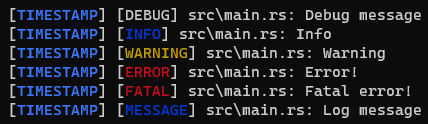
About this project
logging-rs helps you add logging to your projects using simple macros.
Installing
Run the following command to add the package to your dependencies:
$ cargo add logging-rs
...
Git
To clone the repository locally using git run git clone https://github.com/ElBe-Development/logging-rs.git.
Usage
To use logging-rs you need a configuration. It's best to keep it the same across multiple files. You then need to follow these steps:
-
Import the logging-rs crate:
use logging_rs; -
Create a new logger object:
let logger = logging_rs::Logger::new(logging_rs::Formatter::default(), vec![logging_rs::Output::STDOUT]); -
Log the messages you want to log:
logging_rs::debug!(logger, "Debug message");
logging_rs::info!(logger, "Info");
logging_rs::warn!(logger, "Warning");
logging_rs::error!(logger, "Error!");
logging_rs::fatal!(logger, "Fatal error!");
logging_rs::log!(logger, "Log message");
Example
With the following rust code:
use logging_rs;

fn main() {
    let logger = logging_rs::Logger::default();

    logging_rs::debug!(logger, "Debug message");
}
You will get the following output:
[TIMESTAMP] [DEBUG] src\main.rs: Debug message
Where TIMESTAMP is the current timestamp.
Contact
To contact us, get help or just chat with others, you can visit our discord server.